8 Real Estate Social Media Post Ideas: Boost Listings In

Most lists of real estate social media post ideas are a tactical dead end. They give you a pile of disconnected prompts, a few trendy formats, and no system for turning posts into appointments. You get a burst of engagement, then silence, because random posting rarely builds a predictable pipeline.
A better approach starts with business goals. Post to win listings. Post to educate buyers and sellers before they contact you. Post to stay visible in your farm. Post to move active inventory. Post to build local authority that compounds over time. If a post doesn't serve one of those jobs, it's probably filler.
That shift matters because digital is no longer the side channel. Real estate agents now allocate 54.2% of their total marketing budgets to digital channels in 2024, according to real estate digital marketing statistics. Social content sits inside that spend, and it works best when it's built intentionally instead of improvised.
The strongest social plans also reflect how people consume content now. If you want a stream of fresh creative angles, it helps to find viral TikTok content ideas, then adapt them to real estate without copying consumer-brand tactics that don't fit compliance or trust-based selling.
1. Before-and-After Transformation Posts
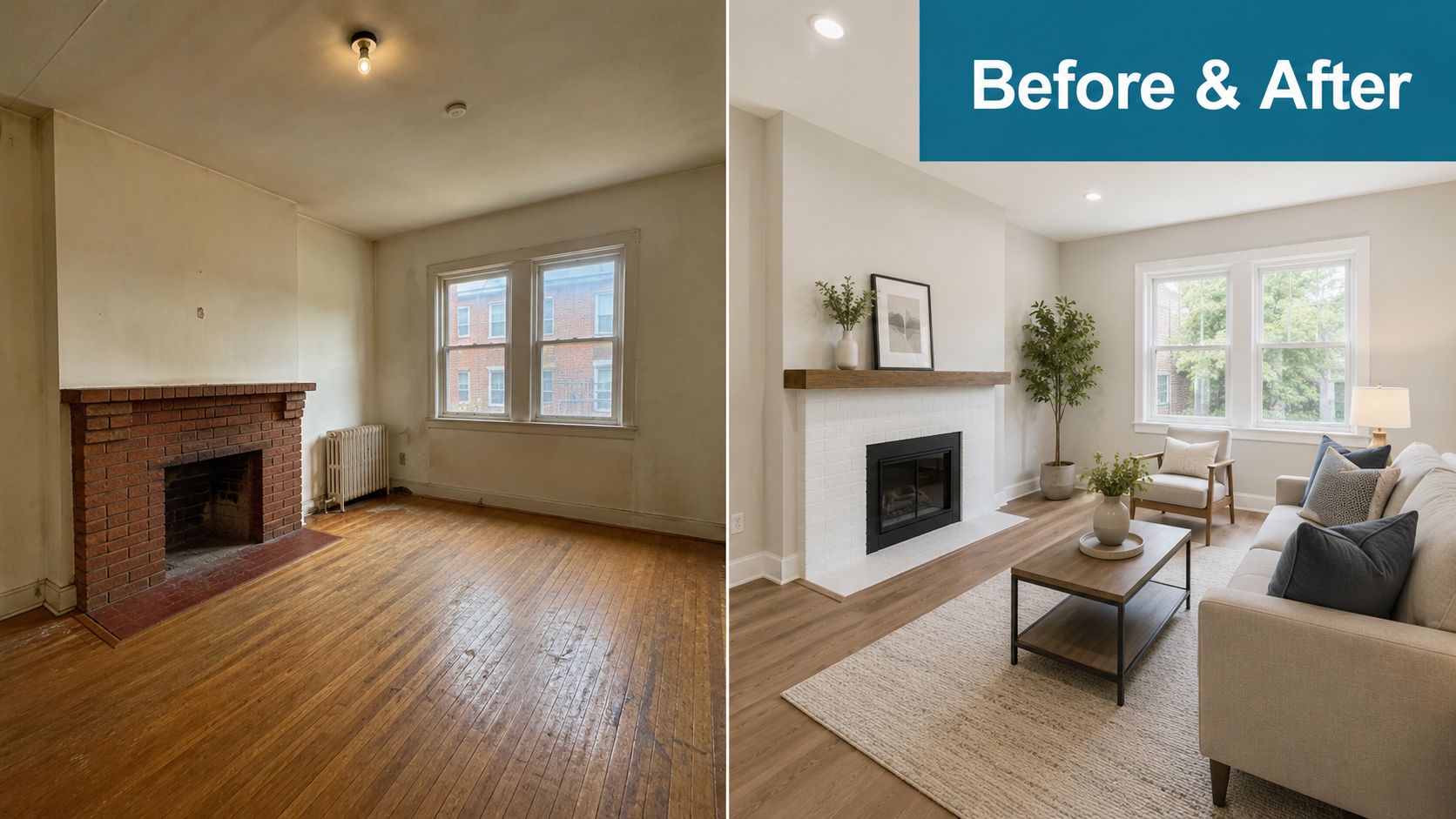
Before-and-after posts are listing-getting content. They show sellers that you can spot what is hurting buyer perception, recommend changes that fit the budget, and present the result in a way that supports the marketing plan. That makes this format useful far beyond renovation eye candy.
Use it to prove judgment.
The strongest version is not just a side-by-side photo. Build a small case study. Show the original condition, explain the change, and connect that change to showings, photography, online presentation, or offer quality. Sellers respond to that because it sounds like the actual job. Real prep decisions involve trade-offs between cost, timing, disruption, and likely impact.
A practical example: fresh paint and better lighting often do more for a listing than a partial remodel that delays launch by three weeks. A cleaned-up yard can matter more than a trendy fixture package if the first photo is the exterior. Good transformation posts teach that you know the difference.
What to feature
Choose changes that reveal your decision-making, not just the final look. Cosmetic updates work well, but so do simpler presentation fixes that sellers can act on quickly.
Useful examples include:
- a dark living room after lighting, furniture removal, and new photo angles
- a kitchen after paint, hardware replacement, and countertop decluttering
- an exterior after mulch, pressure washing, and front-door repainting
- a primary bath after re-styling, mirror replacement, and brighter bulbs
- a vacant room after staging or virtual layout planning
Keep the structure simple and repeatable:
- Before: Show the issue clearly
- Change made: Explain what changed in plain language
- Why it mattered: Tie it to buyer perception, flow, scale, or showability
- How it was marketed: Mention the photos, video, carousel order, or caption framing
Practical rule: Capture the before version early. Once prep starts, the story gets weaker and the post becomes less credible.
Caption angles that stay compliant
Keep the copy focused on the property and the marketing choices. Avoid language about who the home is for, what type of buyer belongs there, or what kind of lifestyle a protected class may prefer. The safer approach is also the stronger one. Specific feature-based language sounds more professional.
A solid caption looks like this: “We replaced warm, uneven bulbs, simplified the furniture layout, and removed visual clutter so the room photographed wider and showed more natural light.” That gives sellers a reason to trust your process.
If you want to turn this into a repeatable content engine, tag each post by goal inside your calendar: win listings, support an active listing, or build local authority through renovation advice. Then batch the format. One folder for before photos, one for afters, one for your explanation clip, and one caption template with a compliance check built in. Teams already using automated Market Insights for real estate agents can apply the same workflow discipline here so social content stays consistent instead of getting built from scratch every week.
2. Market Snapshot and Buyer Education Posts

Most agents post market updates as if everyone already knows what the data means. Buyers don't. They need translation, not charts dumped into a square graphic. A good market snapshot answers the question behind the question: “What does this mean if I'm trying to buy soon?”
This is also one of the strongest formats for search visibility inside AI tools. The gap is obvious. The publisher description cited by Marq says 42% of homebuyers now start searches in ChatGPT or Perplexity, and that many agents still post without AI-friendly structure, according to Marq's real estate social media strategy article. If your captions clearly answer buyer questions, use location-specific language, and stay consistent, your content becomes easier for both people and AI systems to understand.
Make the post explain one market move
Pick one topic per post. Inventory. Rates. Days on market. Negotiation power. Closing cost expectations. Keep it narrow.
Then translate it into action. If listings are sitting longer in one zip code, say what that changes for showing strategy, offer terms, or price negotiation. If inventory is tightening, explain how that changes prep timelines and financing readiness. If you already publish market content, tighten it by linking every data point to a decision.
A strong recurring series often looks like this:
- Monthly snapshot: One local trend, one implication, one action step.
- Myth correction: A common buyer misconception and the reality in your market.
- Offer strategy explainer: How current conditions affect contingencies, timing, and competition.
For agents who want to scale this without rebuilding charts every month, tools that package automated Market Insights for real estate agents can help create repeatable content from local data faster.
Buyers don't need more market noise. They need someone who can say, “Here's the change, here's what it means, and here's what I'd do next.”
Keep it readable
Use plain language in the graphic and fuller context in the caption. If you can't explain the metric to a first-time buyer in two sentences, the post needs work. And if you mention a local source like your MLS or board data, identify it clearly in the creative so the post feels grounded, not improvised.
3. Active Listing Showcase with Problem-Solution Framing

“Just listed” posts rarely do the job on their own. They announce availability, but they do not help the right buyer recognize fit. A stronger showcase starts with the friction the property removes.
That framing matters if your goal is buyer inquiries instead of passive impressions.
A condo with a real entry closet, in-unit laundry, and covered parking solves a daily convenience problem. A two-story home with a bedroom and full bath on the main floor solves a layout problem. A townhome with a fenced patio and low exterior maintenance solves a lifestyle trade-off for buyers who want outdoor space without yard work. Lead with that use case, then support it with specifics buyers can verify in the photos, video, and caption.
Start with the buyer problem the home actually solves
The first line should sound like the buyer's internal checklist.
Examples:
- Need a home office with a door, natural light, and enough wall space for two desks?
- Trying to avoid a renovation before hosting family this year?
- Want separation between bedrooms without giving up open living space?
This is also where experienced agents separate useful marketing from vague hype. “Perfect for entertaining” says almost nothing. “Covered patio off the kitchen, built-in grill, and no rear neighbor” gives a buyer a reason to keep reading.
If your team needs sharper language for captions, remarks, or carousel text, these real estate property description examples show how to turn feature lists into copy that reads clearly without slipping into fluff.
Build the post around proof
Once you name the problem, show the evidence in the same order a buyer would evaluate it. Start with the feature that solves the issue. Then add context that answers the next practical questions. Condition, layout, storage, privacy, light, updates, and access all belong here if they support the claim you opened with.
For active listings, a simple structure works well:
- Opening frame or hook: The problem or priority
- Second frame: The feature that addresses it
- Third frame: Supporting details such as layout, updates, or lot use
- Final frame: Clear next step, showing request, open house, or agent contact
This approach also fits the broader content system behind the article. If one of your goals is to get more listing-side business, showcase posts should do more than market the property. They should show sellers how you position a home, how you choose the angle, and how you avoid generic copy that blends into the feed.
Keep the language persuasive and compliant
Strong listing content still needs discipline. Stay objective. Describe the property and its features without implying who should buy it. Avoid language that points to protected classes or suggests preference. “Main-level full bath and first-floor bedroom” is compliant. “Great for elderly parents” is not. “Quiet office with French doors” is compliant. “Perfect for a work-from-home mom” is not.
Format matters too. Buyers are usually viewing these posts on a phone, so the first frame needs to communicate fast. Short on-screen text, one idea per slide, and a caption that adds context will outperform crowded graphics and oversized paragraphs.
Done well, this post type markets the listing and demonstrates your method. That is its essential value.
4. Open House and Just-Sold Social Sequence

Single-post open house promotion underperforms because it asks people to care instantly. A sequence works better. You build familiarity before the event, create urgency on the day, and turn the activity afterward into proof that your marketing gets attention.
This doesn't mean flooding feeds with repetitive reminders. It means using different angles across several touches. One teaser post on the standout feature. One short walkthrough. One reminder with timing. One day-of clip. Then a follow-up post covering what visitors noticed most.
A sequence that feels intentional
Three to five days out, post the hook. Highlight the kitchen, yard, floor plan, or update package that makes the home worth seeing in person. The day before, post a simple reminder tied to a feature. On open house day, share one useful piece of content, not ten low-quality story updates.
After the event, don't disappear. Recap what generated attention. Mention common questions about the home's layout, finish level, or condition. If the property sells, use the just-sold post to reinforce your process, pricing discipline, and market read.
The best just-sold posts aren't victory laps. They show future sellers how you think.
What not to do
Don't post a misleading crowd shot or exaggerate activity. Article 12 of the NAR Code of Ethics requires a “true picture” in advertising and social media, as summarized in this discussion of Article 12 and social media accuracy. If you say there's strong turnout, make sure that reflects what happened.
Also handle permissions correctly. If you're promoting another agent's listing, get written permission from the listing agent first. UPSTAR's policy guide states that email, text, or direct message permission is needed before posting another agent's listing on social media, as outlined in the Social Media Realtor Policy Resource Guide.
5. Neighborhood Deep-Dive and Local Authority Posts
Local authority doesn't come from saying you “love your community.” It comes from publishing useful, specific analysis that helps people make decisions. Neighborhood deep-dives do that better than generic lifestyle montages.
Many agents often stay too broad. They cover an entire city in one post, mention a few landmarks, and call it local expertise. That doesn't stick. One neighborhood, one development corridor, one school boundary change, one zoning conversation. That's where authority gets built.
Go narrow enough to be memorable
A strong deep-dive might focus on recent infrastructure changes, a shift in housing stock, redevelopment around a corridor, or how one pocket differs from nearby areas in floor plans and lot types. If you're discussing schools, transit, or city planning, keep the framing on property research and decision-making. Avoid language about who an area is suited for.
This format also benefits from niche thinking. HousingWire reports that agents who niche by lifestyle, such as content around dog-friendly neighborhoods, see 3x higher engagement than agents posting generic property content, according to HousingWire's real estate social media marketing article. The practical takeaway isn't to chase novelty. It's to build recurring themes that make your coverage distinct.
Best formats for authority posts
A neighborhood post usually performs better as a carousel, short video explainer, or LinkedIn article than as a single image with a long caption. Use maps, recent street views, planning screenshots if permitted, and your own commentary on what buyers and sellers should watch.
Try formats like these:
- Boundary change analysis: Explain what changed and what it affects operationally.
- Micro-market comparison: Compare two adjacent areas by housing style and turnover pattern.
- Development watch: Summarize an announced project and what nearby owners should track.
You're not trying to sound like a chamber of commerce account. You're showing that you pay attention where money, timing, and housing decisions intersect.
6. Buyer and Seller Education Series
Educational posts earn their place in a real estate content plan when they answer the questions clients ask before they ever book a call. That makes this category useful for a goal-based strategy. If the goal is to warm up future buyers, explain financing, contingencies, and contract timing. If the goal is to win more seller conversations, explain prep, pricing decisions, offer review, and what can delay closing.
Keep this as a series, not a one-off post. A recurring buyer series and a recurring seller series train your audience to expect practical guidance from you, and they make your calendar easier to automate without sounding repetitive.
Build the series around decision points
Organize posts by moments where clients hesitate, second-guess, or make expensive mistakes. That structure produces stronger content than broad advice because it mirrors how real transactions unfold.
For buyers, useful topics include:
- Pre-approval versus pre-qualification
- What happens after an offer is accepted
- How inspection findings affect negotiation
- Appraisal gaps and financing questions
- Final walkthrough issues that matter
For sellers, useful topics include:
- What to do the week before photos
- What buyers notice in the first five minutes
- How showing instructions affect access and feedback
- Why a strong offer is not always the highest offer
- Common closing delays and how to reduce them
Keep the visual treatment consistent, but change the angle. One week can be a carousel with a checklist. The next can be a 45-second video answering one question. Then turn the same topic into an email or FAQ page. If you use automation tools to batch and schedule this work, keep compliance in the workflow. Review captions, fair housing language, and market-specific disclosures before anything goes live. If you're evaluating systems for that process, this guide on AI real estate agent tools compared is a useful starting point.
Good education content lowers anxiety and improves decision quality.
Use short video for high-friction topics
Some topics need your voice. Inspection responses, appraisal issues, earnest money, and closing delays are easier to explain on camera than in a dense caption because tone helps prevent confusion.
Production value matters less than precision. Record at your desk. Use one slide. Speak plainly. Give the audience the next step, not a full licensing class. If a rule varies by state, say that. If a timeline depends on the contract, say that too.
That trade-off matters. Simpler content is easier to publish consistently, but oversimplified advice creates risk. The standard is clarity with limits. Explain the process, note where local practice or legal terms can differ, and invite people to ask for details specific to their transaction.
7. Agent Positioning and Why-Me Content
Agents often avoid this category because they do not want to sound promotional. That creates a bigger problem. Prospects can see your listings, your headshot, and your brokerage logo, yet still have no clear reason to hire you.
Positioning content fixes that gap when it shows how you work. Buyers and sellers are not comparing slogans. They are comparing risk, communication, judgment, and execution.
Show your operating method
Use posts that make your process visible. Walk through how you set price expectations, prepare a home before launch, coordinate showing feedback, protect timelines, and handle negotiation pressure. A short Reel on your pre-listing walkthrough does more for conversion than another graphic that says you care about clients.
Specificity matters here. “I market aggressively” is vague. “I build a launch calendar, write feature-led listing copy, prep a showing plan, and review disclosures before we go live” tells people what working with you looks like.
This category also supports the article's bigger framework. Tie each why-me post to a business goal. If you want more listings, publish content about prep, pricing discipline, and launch execution. If you want more buyer clients, post your touring process, offer strategy, and how you explain contract risk without creating confusion.
Differentiate with evidence
The strongest positioning posts answer one quiet question. Why should someone trust you with a high-stakes transaction?
Use proof that shows decision quality:
- a post explaining why you advised a seller to wait a week before listing
- a carousel showing how you structured competing-offer terms
- a short video on how you prevent small contract issues from becoming closing problems
- screenshots of your prep materials, with private details removed
- a breakdown of your communication standards, including response times and update cadence
That approach works because it replaces self-description with observable process.
Be careful with claims. Avoid language that promises outcomes, implies guaranteed results, or suggests expertise outside your license. If you discuss negotiation wins or pricing strategy, keep the facts tight and remove client-identifying details unless you have written permission to share them.
Explain your tech without hiding behind it
Technology can strengthen your positioning if you explain its role clearly. Clients do not care that you use five apps. They care whether your system helps them price accurately, respond faster, stay organized, and reduce avoidable mistakes.
Say what the tool does in your workflow. For example, if you use automation to draft post variations or batch listing content, say that you still review every caption, fair housing reference, and market-specific disclosure before publishing. That trade-off is worth stating plainly. Automation saves time. Oversight protects your brand and your license.
If you are refining that workflow, this guide on AI real estate agent tools compared is a practical reference. Real-estate-specific tools usually fit better when you need listing language, compliance review, and channel-ready versions inside one process.
Build a repeatable why-me series
Do not treat positioning as occasional brand content. Put it on the calendar as a recurring series with clear angles, clear compliance checks, and a clear business purpose.
A simple monthly rotation works:
- Week 1: your listing prep process
- Week 2: your buyer representation method
- Week 3: a negotiation or transaction-management example
- Week 4: the systems you use to keep clients informed
That structure keeps your feed from drifting back into generic motivation posts and property photos. It also makes repurposing easier. One strong why-me post can become a Reel, carousel, email, listing presentation slide, and FAQ entry with minor edits.
8. User-Generated Content and Client Social Proof
Client proof works best when it is specific, recent, and tied to your process. A polished quote card that says “great agent” does very little. A buyer explaining how you found a financing workaround, or a seller describing how your prep plan reduced days on market, gives prospects something they can evaluate.
Treat this as a system, not a favor you request at closing.
The best time to collect social proof is while the experience is still fresh. Ask after inspection negotiations, after list-date prep, or on closing day, depending on the story you want to capture. That timing matters. Clients give better answers when they are reacting to one clear moment instead of trying to summarize a 45-day transaction from memory.
Use tight prompts, not open-ended requests
Do not ask for “anything you'd like to say.” Give clients a simple format and a short deadline. Response rates go up when the ask is easy to complete on a phone in two minutes.
Use prompts like these:
- What was your biggest concern before we started?
- What did I do that made the process easier?
- What would you tell someone buying or selling in this market?
That structure produces better content and makes repurposing easier across Reels, Stories, carousels, and listing presentations. It also keeps the testimonial grounded in service, communication, and execution instead of vague praise.
Match the post format to the business goal
If the goal is more seller appointments, ask for stories about prep, pricing guidance, showing strategy, and communication. If the goal is more buyer leads, ask for comments about education, speed, negotiation, or problem-solving during escrow.
TikTok, Instagram, and short-form video can work well here because client clips feel less scripted than agent-recorded talking heads. The trade-off is moderation and review. Casual content still needs permission, caption review, and a quick compliance check before it goes live.
Stay compliant and protect the client relationship
Get written permission before posting any client photo, video, review excerpt, or text message. Be careful with anything that reveals timing, financing details, family status, relocation reasons, or other personal information. Fair Housing risk often shows up in the caption, not the testimonial itself.
Edit lightly. Clean up grammar if needed, but keep the client's words recognizable. If the post starts sounding like your ad copy, it loses credibility.
Useful formats include:
- Closing-day photo with context: One client concern, one action you took, one outcome.
- Short client video: What worried them, what changed, what they appreciated.
- Review carousel: One concrete takeaway per slide, with a final slide explaining your process.
- Seller prep story: Before photos, prep steps, launch notes, and the client's reaction, with permission.
Store every approved testimonial in a simple library by topic. pricing, negotiation, first-time buyers, downsizing sellers, relocation, and transaction management. That turns scattered praise into a usable bank of proof you can slot into a content calendar by goal, not just by availability.
8-Point Comparison: Real Estate Social Posts
| Content Type | 🔄 Implementation complexity | ⚡ Resources & speed | 📊 Expected outcomes | ⭐ Effectiveness | Ideal use cases | 💡 Key tips |
|---|---|---|---|---|---|---|
| Before-and-After Transformation Posts (Attract Listings) | Medium–High, requires access to pre/post assets and editing | High resources (photography, ROI data); slower cadence | High engagement; demonstrates listing marketing & renovation ROI | ⭐⭐⭐⭐ | Showcase listing-ready upgrades; attract sellers considering renovations | Include dollar amounts & timeline; use carousel; stay Fair Housing-compliant |
| Market Snapshot and Buyer Education Posts (Educate Buyers) | Medium, data sourcing and clear explanations | Moderate (data access + infographic design); fast once templated | Builds authority, trust, and evergreen search visibility | ⭐⭐⭐⭐ | Monthly market updates, buyer guidance, AI-searchable content | Publish consistently, cite sources, pair with clear action steps |
| Active Listing Showcase w/ Problem-Solution Framing (Promote Listings) | Medium, requires buyer persona insight and accurate property details | Moderate (good photos + targeted copy); relatively quick per post | Higher-quality engagement from motivated buyers; better lead fit | ⭐⭐⭐⭐ | Targeted listing promotion to specific buyer needs | Lead with the problem, include specific measurements, use carousel |
| Open House & Just-Sold Social Sequence (Promote Listings) | High, multi-post coordination and real-time content | High (on-site presence, scheduling); time-sensitive | Creates FOMO and social proof; demonstrates market success | ⭐⭐⭐ | Drive open-house attendance and showcase closed deals | Plan sequence at listing appointment; limit live updates to one strong asset |
| Neighborhood Deep-Dive & Local Authority Posts (Build Authority) | High, research-intensive, long-form content | High time investment; slow to produce but very long-lived | Deep local credibility; attracts sellers and niche searches | ⭐⭐⭐⭐⭐ | Establish hyper-local expertise and SEO leadership | Focus on one neighborhood, cite planning/school sources, include timelines |
| Buyer & Seller Education Series: Process & Expectations (Educate Buyers) | Medium, requires documenting actual processes clearly | Low–Moderate (templates & infographics); scalable and repeatable | Reduces friction, builds trust; improves lead quality | ⭐⭐⭐⭐ | Early-stage buyers/sellers and FAQ-driven content | Use timelines/day ranges; create a series framework; clear CTAs |
| Agent Positioning & "Why Me" Content (Build Authority/Attract Listings) | Low–Medium, needs verifiable metrics and clear messaging | Low–Moderate (data + behind-the-scenes assets); quick to produce | Converts shoppers comparing agents; strengthens listing confidence | ⭐⭐⭐⭐ | Differentiation for listing appointments and recruitment | Back claims with metrics, explain your "why," update regularly |
| User-Generated Content & Client Social Proof (Engage Community) | Medium, coordination, permissions, and quality control | Low–Moderate (clients supply content; management required); efficient over time | Highest third-party credibility; strong conversion and trust | ⭐⭐⭐⭐⭐ | Testimonials, closing-day stories, community engagement | Request within 2 weeks of closing, provide templates, secure permissions |
From Ideas to Implementation
A content strategy only works if it makes it onto the calendar. That's where most agents lose momentum. They know what they should post, but they're rebuilding the plan every week from scratch.
Start with a 30-day framework organized by business goal, not by platform. Pick eight core post types from the categories above. Then assign them across the month so your content mix stays balanced: two listing-attraction posts, two buyer or seller education posts, two active listing posts if you have inventory, one local authority post, and one social proof post. Repeat the cycle with new angles instead of new categories.
A simple 30-day calendar build
Week one can anchor your authority. Post a market snapshot, a neighborhood deep-dive, and one positioning post that explains your process. Week two can focus on active business. Run a listing showcase, an open house sequence touchpoint, and a buyer education explainer. Week three is ideal for transformations and client proof. Week four usually works best for another market or process update plus a local post that keeps you visible even if inventory is thin.
For each planned post, define five things before you create anything:
- Goal: Listings, buyers, authority, visibility, or social proof
- Format: Reel, carousel, story sequence, talking-head clip, or static graphic
- Hook: The first line or first frame
- Proof: The feature, example, screenshot, or explanation that supports the claim
- CTA: A consultative next step
That one-page planning step prevents the usual problem of posting content that looks active but doesn't drive conversations.
Customize by platform instead of cross-posting blindly
Instagram is usually the best home for highly visual content and short-form authority clips. Facebook still matters for broad lead capture and community visibility. TikTok deserves testing if you're comfortable on video and willing to adapt to the platform instead of reposting recycled Instagram content.
Use the same core idea across platforms, but change the packaging. A neighborhood analysis might become a carousel on Instagram, a longer caption post on Facebook, and a quick face-to-camera summary on TikTok. A listing transformation might live as a Reel on Instagram and a simpler before-and-after album on Facebook. Don't treat every platform as if the audience behaves the same way.
Build compliance into the workflow
This part can't be an afterthought. Every post should be reviewed for Fair Housing language. Describe objective property features and location facts, not the kind of person who should live there. LA REALTORS® advises avoiding phrases such as “perfect for families,” “safe neighborhood,” or “walk to church,” and recommends objective descriptions instead, as explained in this guide to Fair Housing advertising standards.
Brokerage identity also needs to be present where required. Real estate social advertising should include the brokerage name and approved logo, and digital business pages should display the Equal Housing Opportunity logo and statement, according to this guide to social media compliance for real estate professionals. If you run a team, create approved templates so agents don't reinvent these elements every time.
Automate the repetitive part
Manual planning is possible, but it's slow. The repetitive work is what burns agents out: caption drafting, resizing, rewriting for each platform, checking tone, checking compliance, and keeping the calendar full while listings and clients demand attention.
That's where a real-estate-specific system helps more than a general AI writer. ListingBooster.ai is built around listing and authority content for agents, teams, and brokerages, so it fits this workflow more naturally than a blank chatbot prompt. If you want a practical way to turn these real estate social media post ideas into a repeatable monthly system, using a purpose-built tool can cut the planning load and keep the output closer to how agents market property.
If you want a faster way to turn listing details, market updates, and authority topics into a workable monthly plan, ListingBooster.ai is worth a look. It's designed for real estate workflows, which makes it easier to build compliant captions, platform-specific content, and a consistent 30-day calendar without starting from a blank page every time.
Walk In With the Campaign Already Built
Listing copy, social posts, sourced Market Insights, growth scheduling, and direct publishing after approval from one real-estate-specific system. 25 free credits to start.
Related Posts
 Uncategorized
Real Estate Content Marketing: The 2026 Playbook
Listings with video can generate 49% more qualified leads, according to a 2026 real estate digital marketing roundup. That figure changes the question. Real estate content marketing isn't about how often you post. It's about whether your listing, expertise, and local knowledge can be found, understood, and cited by people and by the AI tools […]
 Uncategorized
AI for Real Estate Marketing: A Practical Playbook
A new listing goes live on Tuesday morning. You write the description from memory, schedule three social posts, answer showing requests, and move on to the next client task. By afternoon, the listing has plenty of activity on your side of the business, but the phone still isn't producing the conversations you expected. That gap […]
 Uncategorized
What Is IDX and Why It Still Matters for Real Estate
A new agent usually hears “IDX” during a brokerage onboarding call, nods along, and hopes nobody asks for a definition. Then the questions arrive: Why are listings appearing on the website? Who controls the data? Why did a property remain visible after its status changed? And will the same pages be readable by ChatGPT, Perplexity, […]