Real Estate Schema Markup: Boost Local SEO and Listings

Think of real estate schema markup as a secret language you teach your website to speak directly to search engines. It's a specific type of code that takes the jumble of information on a property listing—the address, price, square footage—and neatly organizes it into a format that Google, Bing, and AI assistants can instantly understand.
Instead of just seeing text, they see a structured RealEstateListing. This small change has a huge impact.
Why Schema Markup Is Your New Competitive Edge

In a digital market overflowing with listings, just showing up in search results isn't enough. While your standard SEO efforts help you get found, schema markup is what helps you win the click. It's the technical secret sauce that transforms a boring blue link into an eye-catching rich snippet, often featuring a property photo, price, and availability right there on the results page.
This structured data doesn't just make your listings more attractive to people scrolling by; it makes them perfectly digestible for the bots and AI systems that power modern search. And as homebuyer habits shift, that distinction is becoming everything.
Boost Your Visibility and Attract Motivated Buyers
When you add schema to your listings, you’re basically handing Google a perfectly organized spec sheet for each property. This clarity allows your listings to pop up in more relevant search carousels and specialized result types, giving your online presence a serious boost.
The difference is staggering. We've seen that pages using schema can achieve a 40% higher click-through rate (CTR) than those without it. Even more telling, these visually appealing rich results snag 58% of all clicks, leaving standard results to fight over the remaining 41%. This isn't just a minor tweak; it's a fundamental advantage, especially as more buyers turn to AI for their initial research.
Key Takeaway: By structuring your listing data with schema, you're answering a buyer's most pressing questions before they even click. This pre-qualifies your audience, driving higher-intent traffic and, ultimately, better leads.
To give you a clearer picture, here's how schema changes the game for your property listings.
The Immediate Impact of Schema on Your Listings
| Feature | Without Schema Markup | With Schema Markup |
|---|---|---|
| Search Appearance | A standard blue link with a basic title and description. | A rich snippet with a photo, price, and bed/bath count. |
| Click-Through Rate | Relies solely on compelling copy to earn a click. | Attracts more clicks with visual cues and key data. |
| AI & Voice Search | Invisible. AI cannot reliably parse the unstructured data. | Prime candidate for being featured in AI-generated answers. |
| Local SEO | Address is just text; less likely to appear in map packs. | Address is clearly defined, improving map and "near me" visibility. |
As you can see, the benefits go far beyond aesthetics. It's about making your data more useful and accessible to both humans and machines.
Adapting to the Age of AI Search
The home search process isn't what it used to be. Today, over 40% of homebuyers are starting their search with AI tools like ChatGPT or relying on Google's AI Overviews. These systems don't "read" websites like people do; they hunt for clean, structured data to give direct, confident answers. Without schema markup, your listings are practically invisible to this massive, growing audience.
By implementing schema, you ensure your properties aren't just indexed but are deeply understood. This makes them the perfect source for an AI assistant to pull from when a user asks for "three-bedroom homes in downtown Austin under $700k."
Here’s what that means for you in practical terms:
- Enhanced Rich Snippets show off key details like price, bed/bath count, and square footage right in the search results.
- Improved Local SEO Performance comes from clearly defining property addresses and coordinates, making you a stronger contender for map-based searches.
- Future-Proofing Your Listings prepares your business for the next wave of voice search and AI-first real estate platforms that demand structured data.
When you make your data easy for machines to process, you position yourself as an authoritative source of information. You can dig deeper into how Google's AI is transforming real estate search to see just how critical this is for staying relevant. At the end of the day, schema is the bridge connecting your MLS data to the future of how people find their next home.
The Essential Schema Types Every Agent Should Know
When you're trying to get a search engine's attention, you have to speak its language. For us, that language is schema markup. While there are hundreds of different schema "types," you really only need to master a few key ones to make your listings and your personal brand pop in search results.
Think of it as building a digital dossier for each property. Every piece of schema you add is another layer of rich detail, creating a complete picture that both Google's algorithms and, more importantly, your potential clients can instantly understand. Let's dig into the core building blocks you'll be working with.
The Foundation: RealEstateListing
The absolute cornerstone of everything we're doing here is the RealEstateListing schema. This is the main bucket that holds all the juicy details about a property for sale or rent. It’s your way of telling Google, in no uncertain terms, "Hey, this page is about a specific property on the market."
But you can get even more granular. Inside the main RealEstateListing type, you can specify exactly what kind of property it is—a SingleFamilyResidence, an Apartment, a House, or even an entire ApartmentComplex. This is huge. That little detail is what helps Google connect your listing with someone searching for "single-family homes for sale in Denver."
Describing the Property and Location
Once you've set the stage with the listing type, it's time to fill in the critical details. This is where you start "nesting" other schema types inside your main one to add layers of precision.
Place: This one is non-negotiable for local SEO. It pins down the physical location of the property—street address, city, state, postal code. Using the
Placeschema forges a direct link between your listing and a geographic area, which is exactly what you need to show up in map packs and "near me" searches.GeoCoordinates: To really dial it in, you nest
GeoCoordinateswithin thePlaceschema. This provides the exact latitude and longitude. For a search engine, this is the ultimate source of truth. It removes any and all guesswork about where the property is, ensuring it appears correctly on maps.
These two work hand-in-hand to put your listing on a physical spot on the map. That's how you capture local buyers.
When you combine
RealEstateListingwith specific location data likePlaceandGeoCoordinates, you're not just describing a house. You're pointing to this exact house at this exact location. That level of precision is what attracts high-intent local traffic.
Detailing the Offer and Agent Information
A listing is just a pretty picture without the price and a person to call. Two more schema types handle this essential information, giving buyers what they need to actually make a move.
First up is the Offer schema. You nest this right inside your RealEstateListing to spell out the dollars and cents. The key fields here are:
price: The asking price for the property.priceCurrency: The currency, like "USD".availability: The current status, such asInStock(which means available) orSoldOut(sold).
Keeping this info perfectly aligned with what's on your page is critical. If your schema says one price and your webpage says another, you'll confuse Google and could lose your chance at getting those valuable rich results.
Finally, the RealEstateAgent schema is all about building your credibility and brand. This identifies you or your brokerage as the professional behind the listing. You can include your name, phone number, brokerage, and even links to your social profiles. By connecting this schema to a listing, you're telling Google, "This expert is representing this property," which boosts the authority of both the listing and your own online profile.
How to Implement JSON-LD for Your Listings
Alright, let's get into the nuts and bolts of putting this into practice. Implementing real estate schema might sound like a job for a developer, but it's really just about translating your property details into a language that search engines speak fluently. We'll be using JSON-LD, which is Google's preferred format because it's clean and doesn't interfere with your website's design code.
Think of it like creating a universal spec sheet for your listing. You’re simply taking the information you already have—address, price, bedrooms from the MLS—and mapping it to standard schema properties. This structured data script then gets added to the page, making it instantly digestible for search crawlers and AI.
This simple diagram shows how the core pieces of your schema come together, pulling in data about the agent, the property, and its location to create a unified profile.
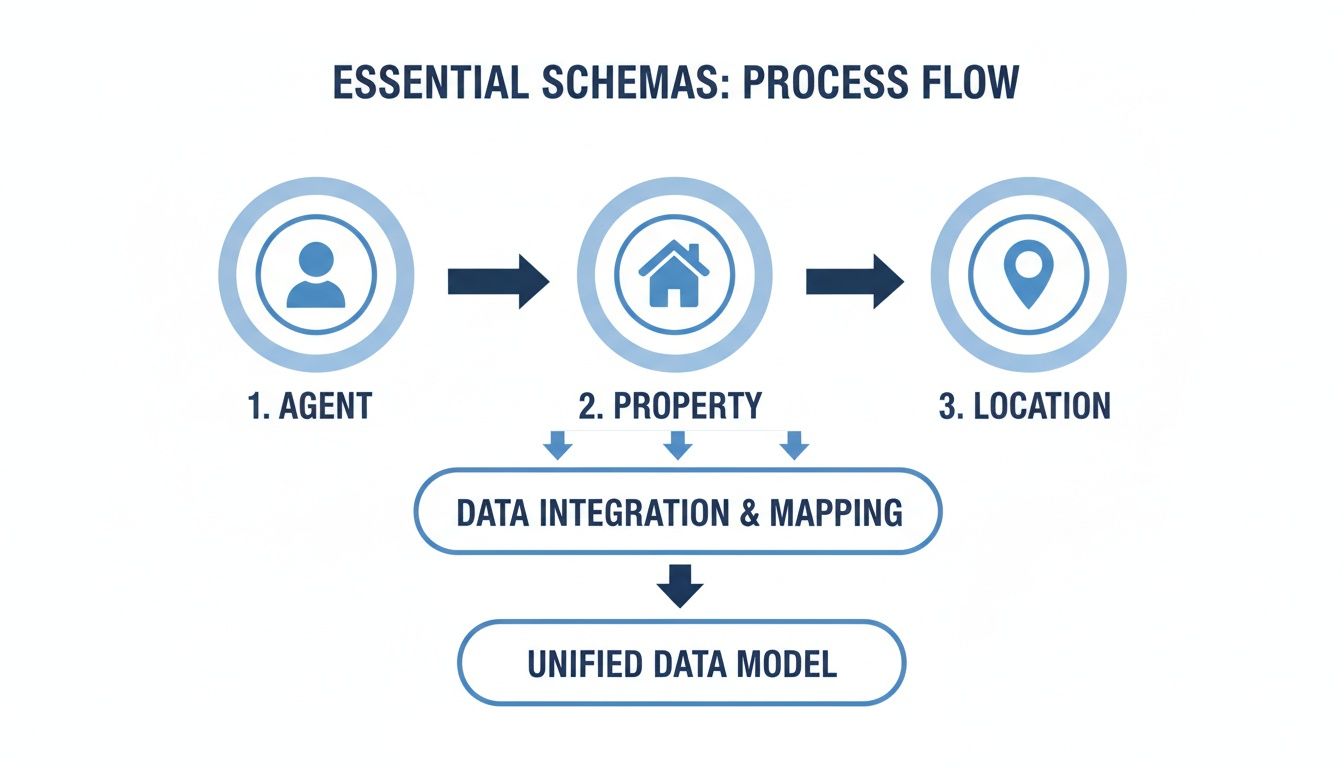
This flow is key. It visualizes how all those separate data points are combined into a comprehensive, machine-readable story for each listing that search engines can process in a snap.
Mapping Your MLS Data to Required Schema Fields
First things first, you need to match your listing info to the correct schema fields. Some fields are non-negotiable—they're essential for your schema to even be considered valid. Others are highly recommended because they make your listings far more competitive and useful to buyers.
Let's start with the must-haves.
These properties are the absolute foundation of your RealEstateListing schema:
@type: This tells Google what kind of thing you're describing. You'll always useRealEstateListing.name: A descriptive title for the property, like "Stunning 4-Bedroom Colonial in Westlake."url: The direct, permanent URL of the listing page on your site.offers: This is where you nest the pricing and availability details. It needs its own@typeofOffer, along with theprice,priceCurrency, andavailability.
To give you a practical idea of how this works, I've put together a quick mapping table. This shows you how to take common fields from your MLS data and plug them into the required JSON-LD properties.
Mapping MLS Fields to Required JSON-LD Properties
| MLS Field | JSON-LD Property | Example Value |
|---|---|---|
| Listing Title/Headline | name |
"Charming 3-Bedroom Home with Modern Updates" |
| Listing URL | url |
"https://yourwebsite.com/listings/123-maple-ave" |
| Listing Price | price |
"350000" |
| Currency | priceCurrency |
"USD" |
| Listing Status | availability |
"https://schema.org/InStock" (for Active listings) |
Getting these basics right is the most critical part of the process. If you nail these, you're already ahead of the game.
My Two Cents: Don't just dump the property address into the
namefield. This is prime real estate. Craft a descriptive, keyword-rich title that highlights a key feature, just like you would for a headline. It helps both users and search engines understand what makes the property special right away.
It's amazing how many sites miss this. While over 45 million domains use some form of schema, industry data shows that only about 30% of all websites have implemented it correctly. When you consider that 72.6% of top-ranking pages on Google use schema, that gap represents a massive opportunity to outmaneuver your competition.
Adding Highly Recommended and Optional Properties
Once you have the essentials locked in, it’s time to add the details that make your listings truly shine. These "highly recommended" fields provide the rich context that powers those eye-catching search results and helps buyers make decisions before they even click.
Think about what buyers are constantly asking about. These properties answer those questions preemptively.
- address: A structured property using
PostalAddressto clearly define the street, city, state, and zip. - geo: Nested inside
address, theGeoCoordinatesproperty useslatitudeandlongitudefor perfect map placement. - image: A list of URLs for your best high-quality photos. Don't skimp here; visuals sell.
- description: Your compelling property description, the same one you've already written.
- floorSize: Uses a
QuantitativeValueto specify square footage (e.g.,"value": "2400","unitCode": "SQFT"). - numberOfBedrooms & numberOfBathroomsTotal: Simple, straightforward numbers.
- amenityFeature: A fantastic property where you can list out all the good stuff like a pool, fireplace, or two-car garage.
This is what helps you show up for those super-specific searches like "four-bedroom house with a pool in Austin." For a deeper dive into preparing for these new search patterns, check out our guide on how to optimize your listings for AI search.
Putting It All Together: A Complete JSON-LD Example
Let's see what this looks like when we combine everything into a complete, ready-to-use JSON-LD script for a single-family home. You can use this as a template—just swap out the example values with your own property data.
{
"@context": "https://schema.org",
"@type": "RealEstateListing",
"name": "Charming 3-Bedroom Home with Modern Updates",
"url": "https://www.yourexamplerealestate.com/listings/123-maple-street",
"description": "Discover this beautifully updated 3-bedroom, 2-bathroom home in the heart of Springfield. Features a newly renovated kitchen with granite countertops, a spacious backyard, and a two-car garage. Perfect for families!",
"image": [
"https://www.yourexamplerealestate.com/images/123-maple-1.jpg",
"https://www.yourexamplerealestate.com/images/123-maple-2.jpg",
"https://www.yourexamplerealestate.com/images/123-maple-3.jpg"
],
"accommodationCategory": "SingleFamilyResidence",
"numberOfBedrooms": 3,
"numberOfBathroomsTotal": 2,
"floorSize": {
"@type": "QuantitativeValue",
"value": "1800",
"unitCode": "SQFT"
},
"address": {
"@type": "PostalAddress",
"streetAddress": "123 Maple Street",
"addressLocality": "Springfield",
"addressRegion": "IL",
"postalCode": "62704",
"addressCountry": "US"
},
"geo": {
"@type": "GeoCoordinates",
"latitude": "39.7817",
"longitude": "-89.6501"
},
"offers": {
"@type": "Offer",
"price": "350000",
"priceCurrency": "USD",
"availability": "https://schema.org/InStock"
}
}


Once you’ve filled this out with your listing’s details, you just need to place it on your website. The standard way to do this is to wrap the code in a <script type="application/ld+json"> tag and insert it within the <head> section of that specific property's page. If you're on a platform like WordPress, there are often plugins or theme settings that make this easy. This placement ensures search crawlers find and process your structured data right away.
Making Sure Your Schema Actually Works
You've done the hard work of creating your real estate schema markup, but don't pop the champagne just yet. That code is only useful if search engines can actually read it. A single misplaced comma or a missing quote can render the whole thing invisible, meaning all that effort was for nothing.
This is why validation isn't just a "nice-to-have" final check; it's a non-negotiable step in the process. Think of it like a final walkthrough before closing a deal. You need to be certain that Google and other search engines can understand every last detail you've meticulously added to your JSON-LD script.
The Right Tools for the Job
The good news? You don't need a degree in computer science to do this. Google gives us a fantastic, free tool for this exact purpose: the Rich Results Test. This is your first and most important stop. It tells you directly whether Google sees your markup correctly and if your page is eligible for those valuable, eye-catching search features.
For a second opinion, I also recommend the Schema Markup Validator from Schema.org. While Google's tool focuses on what it cares about for rich results, the Schema.org validator checks your code against the universal standard. Running your code through both gives you complete peace of mind.
It’s simple to use. Just grab your property page URL or paste the JSON-LD code snippet directly into the tool. It will immediately scan everything and flag any issues that need fixing.
Here's a look at the Rich Results Test tool before you plug in your URL or code.
This clean interface is your gateway to confirming your schema is flawless and ready to be crawled.
What Your Test Results Mean
After running the test, you’ll get an instant verdict. A beautiful green checkmark is what you're aiming for, confirming your page is eligible for rich results. The report will break down the specific schema types it found, like RealEstateListing or BreadcrumbList, showing you that everything is being picked up correctly.
But don't panic if you see red or orange. It happens to everyone, especially at first.
- Errors are the deal-breakers. These are critical problems that stop your page from being eligible for rich results. You must fix these.
- Warnings are more like strong suggestions. They point out recommended details you've left out. Your schema will still work, but adding this info can make your listing much more powerful.
My Two Cents: Don't ignore the warnings. Seriously. That missing
imageorreviewfield might seem small, but it could be the very thing that makes a buyer click on your competitor’s listing instead of yours.
Fixing the Most Common Schema Mistakes
Over the years, I've seen agents run into the same handful of hiccups when they first start with schema. Luckily, they're usually quick fixes once you know what to look for.
Here are the most common culprits and how to sort them out:
- Missing Required Fields: Forgetting a fundamental property like
nameoroffersis a classic mistake that will always throw an error. Double-check your code to make sure all the essentialRealEstateListingpieces are there. - Wrong Price Format: This one gets people all the time. The
priceneeds to be just a number—no dollar signs, no commas. So, it should be"price": "495000", not"$495,000". You define the currency separately with thepriceCurrencyfield. - Bad Availability URL: You can't just type "Available." The
availabilitystatus needs a proper Schema.org link. For an active listing, that’s"https://schema.org/InStock". When it sells, you'll change it to"https://schema.org/SoldOut". - Simple Syntax Errors: A rogue bracket or a missing comma can bring the whole script down. These are the most frustrating but also the easiest to fix. Carefully scan your JSON-LD for typos, or use an online JSON validator to pinpoint the exact line causing the problem.
By methodically testing your code and keeping an eye out for these common slip-ups, you can deploy your schema with confidence. You'll know it's perfectly tuned to grab the attention of both search engines and the buyers you want to attract.
Automating Your Schema With ListingBooster.ai

While manually building your real estate schema gives you ultimate control, let's be honest—it's a meticulous and time-consuming job. I've seen it happen time and again: a single misplaced comma or a price that wasn't updated can undo all that hard work in an instant. This is where automation stops being a simple convenience and becomes a real strategic advantage.
Think about it. Instead of spending hours matching MLS fields to schema properties and wrestling with JSON-LD code, you can use a tool built for the job. This approach practically eliminates the risk of human error and frees you up to focus on what actually moves the needle: serving clients and closing deals.
How Automation Takes the Guesswork Out of It
The biggest headache with manual schema is keeping everything current. Prices get reduced, a property goes from "For Sale" to "Pending," or new photos get uploaded. An automated system like ListingBooster.ai takes this entire burden off your shoulders by generating perfectly optimized JSON-LD for you.
Our platform’s 'Listing Commander' engine was designed specifically for this. All you have to do is provide a property URL. It gets to work, intelligently pulling all the necessary data and structuring it into the exact schema format that search engines and AI platforms like Google and ChatGPT need to see.
What takes hours of manual coding and validation can be accomplished in just a few minutes with the right tool. This isn’t just about saving time; it's about deploying a flawless, competitive SEO strategy at scale.
This means every single property you're marketing is equipped with clean, error-free structured data from the moment it goes live. No need to become a part-time coder or cross your fingers when you hit "validate."
The Strategic Advantage of Automated Schema
In a market this competitive, speed and accuracy are non-negotiable. Automation gives you a clear edge by making sure your listings are instantly machine-readable, which dramatically increases their chances of showing up in rich snippets and AI-powered search results.
Here’s a quick look at how it changes the game:
- The Old Way: Hunt down a code template, painstakingly copy-paste property data, triple-check the JSON-LD for mistakes, inject it into your site's header, and then run it through multiple validation tools to find the inevitable error.
- The Smart Way: Enter a listing URL into ListingBooster.ai, and the platform generates and embeds the correct schema for you. Done.
This kind of efficiency is a lifesaver for agents, teams, and brokerages juggling multiple properties. Schema stops being a tedious chore and becomes a seamless, integrated part of your marketing machine. If you want to get ahead of the curve, it's worth learning more about how a dedicated real estate AI platform can future-proof your business.
At the end of the day, automation turns a complex technical task into a simple, repeatable action. It’s the best way to guarantee your listings are always speaking the language of search engines, helping you attract more qualified buyers without getting bogged down in the code.
Common Questions About Real Estate Schema
Getting into the technical side of real estate marketing can feel daunting, but when it comes to schema, most of the hang-ups come from just a few common questions. Once you get these straightened out, you'll have the confidence to put this powerful tool to work.
We've rounded up the questions we hear most often from agents and brokers to clear up any confusion and help you get started.
Do I Need to Be a Coder to Use Real Estate Schema Markup?
Not at all. This is probably the biggest misconception out there. While schema is technically code, you don't need to be a developer to make it work.
The job isn't about writing code from scratch. It's about taking a proven template—like the ones in this guide—and simply plugging in your property's specific details. Think of it as filling out a form, not building an engine. You're just matching the address, price, and square footage to the right fields.
A great analogy is driving a car. You don't need to be a mechanic to get where you're going. You just need to know how to operate it. Schema is the same; you just need to know what information to provide, not how to build the code itself.
And if you want a completely hands-off approach, tools like ListingBooster.ai generate the code for you automatically. Your only job is to provide the listing info.
Where Exactly Does the Schema Code Go on My Website?
This is a fantastic and crucial question. The code needs to be in the right spot for search engines to find it quickly.
The official best practice, recommended by Google, is to place your JSON-LD script inside the <head> section of your property listing's HTML. Putting it here ensures that when a search engine crawler visits your page, it sees and understands the structured data immediately.
If you’re using a CMS like WordPress, you have a few options:
- Theme Settings: Many modern themes have a dedicated section for adding scripts to the header.
- Plugins: You can find dozens of simple plugins designed to inject code snippets into your site’s
<head>or<body>. - Custom Fields: For more advanced setups, you can use custom fields to populate the schema template dynamically.
Of course, platforms built for this, like ListingBooster.ai, handle this placement for you. The code gets put in the right place every time without you ever having to touch the website’s backend.
Can I Use the Same Schema Code for Multiple Listings?
Absolutely not. This is a critical mistake to avoid. Each schema script must be 100% unique to the specific property it describes.
While the template remains the same, the data inside—the address, price, photos, description—must be changed for every single listing. Copying and pasting the exact same block of code across different property pages is a recipe for disaster.
It sends confusing, contradictory signals to Google and can seriously hurt your SEO. It can even cause Google to distrust all the structured data on your site. Accuracy is everything.
How Long Until I See Rich Snippets in Google Search?
There’s no magic number here. When rich snippets appear depends entirely on Google's own schedule for crawling and indexing your site.
Once you’ve added and validated your schema, you can give Google a nudge. Just head into Google Search Console and request a re-index of the page. This can sometimes speed things up.
Generally, you could see results anywhere from a few days to several weeks later. The most important thing is consistency. When you implement correct schema across all your listings, you're signaling to Google that your site is a reliable source of property data. That builds trust, which is what ultimately earns you those valuable, eye-catching rich results.
Ready to stop wrestling with code and start dominating AI search? ListingBooster.ai automates the entire real estate schema markup process, generating flawless, optimized JSON-LD for every property in minutes. Give your listings the competitive edge they deserve by making them instantly understandable to Google and ChatGPT. Try it free today at https://listingbooster.ai and see the difference automation makes.
Walk In With the Campaign Already Built
Listing copy, social posts, sourced Market Insights, growth scheduling, and direct publishing after approval from one real-estate-specific system. 25 free credits to start.
Related Posts
 Real Estate SEO
How to Get More Seller Leads with Real Estate SEO in 2026
Organic search still produces seller leads. The difference is how those leads are discovered, filtered, and trusted before a homeowner ever contacts you. For years, agents treated SEO as a way to rank a few pages and wait for form fills. That approach misses what seller SEO does. It puts your name, market coverage, and […]
 Real Estate SEO
Local SEO for Real Estate Agents with AI: A 2026 Guide
Real estate leads are still won or lost in local search, but the way agents earn visibility has changed. A strong position in search no longer guarantees attention, because buyers and sellers increasingly see AI-generated summaries before they ever click a website. That changes the job. Agents now need a web presence that search engines […]
 Real Estate SEO
How to Build Topical Authority as a Real Estate Agent: 2026
Real estate SEO used to reward volume. Publish enough pages, target enough keywords, and you could usually earn some visibility. That playbook is fading. The stronger model now is a connected authority system, built around pillar pages and supporting clusters that cover the buyer and seller journey in depth, as outlined in this real estate […]