Boost Visibility with schema markup for real estate listings: A practical guide

Think of schema markup as a translator for your real estate listings. It's a special kind of code you add to your website that tells search engines like Google exactly what they're looking at—not just a page with words and numbers, but a specific property for sale or rent with a price, address, and number of bedrooms.
This structured data is what powers those eye-catching rich results you see in Google search, where key details pop out right on the results page. It's a simple change that makes your listings impossible to ignore and grabs a buyer's attention before they even click.
Why Schema Is a Game Changer for Real Estate Agents

In a digital marketplace overflowing with listings, just having a beautiful property isn't enough to get noticed. Schema markup has quickly evolved from a technical "nice-to-have" into a must-have tool for any serious real estate agent. It’s the invisible framework that gives search engines context.
Here's a practical example: without schema, Google sees a webpage with text like "3 bedrooms," "$500,000," and "Miami." With schema, it understands that this is a SingleFamilyResidence with a numberOfRooms value of 3, available for sale under an Offer of $500,000, and located in the city of Miami. That level of clarity makes all the difference.
Turning Data Into Your Competitive Edge
This structured approach is what allows search engines to showcase your properties in much more compelling ways. When you implement the right schema, you unlock rich results that put the most important information front and center on the search results page.
This isn't just theory; it has a real impact on your bottom line. We've seen from industry data that real estate websites using schema correctly can see their click-through rates (CTR) jump by 20-30% compared to listings without it. Why? Because rich results that highlight price, square footage, and availability are simply more enticing to a homebuyer scrolling through pages of links.
Key Takeaway: Schema markup isn't just an SEO trick. It transforms a standard listing page into a dynamic marketing tool that answers a buyer's most pressing questions before they even visit your site.
Connecting Schema to Real Business Goals
At the end of the day, it's all about generating more qualified leads, and this is where schema truly delivers. By presenting clear, structured information right away, you attract buyers who are serious and have already self-qualified based on the details you provided.
This translates directly into tangible business results:
- Higher Click-Through Rates: Rich snippets are visually appealing and stand out, naturally earning more clicks from interested buyers.
- Better Quality Leads: When a user clicks, they already know the key details, which means they are much further along in their journey.
- Improved Search Visibility: Proper schema helps Google categorize your listings, boosting your chances of ranking for specific, high-intent searches like "three-bedroom house for sale in Miami."
- Future-Proofing for AI: As AI tools and conversational search grow, they will rely on structured data to find and present real estate information. Schema makes your listings ready for that future.
For agents looking to streamline this, platforms like ListingBooster.ai are built to automate much of the marketing work, including creating optimized content. But understanding the fundamentals is key, and this guide will walk you through exactly how to put schema to work for your own listings.
Choosing the Right Schema for Your Properties
Okay, let's get into the practical side of things. Simply knowing why you need schema is one thing, but knowing how to implement it is where you really start seeing results. The secret isn't just slapping some code on your property pages; it's about being incredibly specific and choosing the right structured data to describe what you're selling or renting.
Think of it this way: you're creating a crystal-clear filing system for Google. The more precise your labels, the faster and more accurately it can pull up your listing for a genuinely interested buyer.
At the very top, you have the RealEstateListing schema. This is your main container, the big bucket that tells search engines, "Heads up, this page is about a property on the market." It’s your starting point for all the transactional details—who the agent is, when the listing went live, and so on.
But that's just the beginning. To really make your listing pop in search results, you have to layer in more detail. The RealEstateListing schema is most powerful when you nest more specific property types inside it. This is how you give Google the juicy details it loves to show off in those rich results.
Get Specific: Matching Schema to Property Types
Let's be honest, not all properties are created equal, and your schema needs to reflect that. Just using a generic Residence tag is fine, I guess, but it's a missed opportunity. If you're listing a classic suburban house, using SingleFamilyResidence sends a far stronger and more accurate signal.
The same goes for a unit in a high-rise building. In that case, Apartment is the right call. These details really matter because they directly map to how people search. Someone typing "downtown apartment for rent" has a very different goal than someone looking for a "four-bedroom house for sale." Using the correct schema is your best bet for capturing that high-intent traffic.
The official Schema.org page for RealEstateListing shows just how deep you can go.
Just look at that list. From datePosted to leaseLength, you have everything you need to paint a complete picture for search engines.
Real-World Scenarios: Putting it All Together
So, how does this look in practice? The best schema combination depends entirely on the property and what you're trying to achieve.
Here are a few common situations you probably deal with every week:
The Suburban Home for Sale: Imagine a four-bedroom house in a nice, quiet neighborhood.
- Primary Schema:
RealEstateListingto set the stage for the transaction. - Nested Property Type:
SingleFamilyResidenceto clarify it's a standalone house. - Transaction Schema:
Offerto state the asking price, like"$550,000".
- Primary Schema:
The Downtown Condo for Rent: A sleek two-bedroom unit in a modern building.
- Primary Schema:
RealEstateListingto frame it as a rental. - Nested Property Type:
Apartmentto define the unit. - Transaction Schema: Use
OfferwithpriceSpecificationto show it's a rental (e.g.,"$2,800"per month) and include theleaseLength.
- Primary Schema:
An Upcoming Open House: You need to get the word out about a specific viewing time.
- Primary Schema: Start with
RealEstateListingand the right property type (SingleFamilyResidence,Apartment, etc.). - Event Schema: Nest an
Event(specifically anOpenHouseEvent) inside the listing. This is where you'll announce the date, start time, and end time, which can trigger those special event-based snippets in search results.
- Primary Schema: Start with
My Two Cents: Don't ever skip the
Offerschema. ARealEstateListingdescribes what the property is, but theOffertells people the price and availability—arguably the two most important details for anyone searching. Without it, your rich snippet is missing the whole point.
By thoughtfully combining these schema types, you're essentially handing Google an unambiguous roadmap to your listing's data. That precision is what gives the search engine the confidence to feature your properties with those detailed, eye-catching rich snippets that bring in more qualified clicks and better leads.
Building Your First JSON-LD Snippets from Scratch

Alright, let's get our hands dirty and build the actual JSON-LD code that makes your listings stand out to search engines. The code might look a bit technical at first glance, but I promise it's more like filling out a form than writing software from scratch.
Think of it like this: JSON-LD is just a way of organizing your listing's key details—address, price, bedrooms—into a neat, machine-readable format. By labeling each piece of information, you're essentially handing Google a perfect summary of your property, which it can then use to build those eye-catching rich results.
My goal here is to give you a few solid, adaptable templates. You won't need to become a coding expert; you just need to know how to swap out the placeholder details with your own.
The Classic Single-Family Home for Sale
Let's start with the bread and butter of real estate: a single-family home for sale. Imagine you're listing a great three-bedroom house at 123 Main Street. The schema needs to clearly state its type, location, features, and sale price. To do this, we'll create a RealEstateListing that wraps two key components: a SingleFamilyResidence (the house itself) and an Offer (the sale details).
Here’s a practical JSON-LD snippet you can use as your foundation:
{
"@context": "https://schema.org",
"@type": "RealEstateListing",
"name": "Charming Three-Bedroom Home in Sunnydale",
"url": "https://www.yourownwebsite.com/listings/123-main-st",
"datePosted": "2024-10-26",
"itemOffered": {
"@type": "SingleFamilyResidence",
"name": "123 Main Street",
"address": {
"@type": "PostalAddress",
"streetAddress": "123 Main Street",
"addressLocality": "Sunnydale",
"addressRegion": "CA",
"postalCode": "90210",
"addressCountry": "US"
},
"numberOfRooms": "3",
"floorSize": {
"@type": "QuantitativeValue",
"value": "1800",
"unitCode": "SQF"
},
"geo": {
"@type": "GeoCoordinates",
"latitude": "34.0522",
"longitude": "-118.2437"
}
},
"offers": {
"@type": "Offer",
"price": "750000",
"priceCurrency": "USD",
"availability": "https://schema.org/InStock"
}
}
See how it works? The itemOffered section defines the physical house, while the offers part handles the money side of things. Pay special attention to the geo property—adding latitude and longitude coordinates is a fantastic way to nail down your location for local search and map-based queries.
The Urban Apartment for Rent
Now, let's switch gears to a rental. An apartment listing has a slightly different focus, especially when it comes to the lease terms. We'll use the Apartment schema type and tweak the Offer to show a monthly rent instead of a one-time sale price.
Here's how you'd structure the JSON-LD for a two-bedroom apartment:
{
"@context": "https://schema.org",
"@type": "RealEstateListing",
"name": "Modern 2-Bedroom Apartment with City Views",
"url": "https://www.yourownwebsite.com/rentals/456-high-tower-unit-10a",
"datePosted": "2024-10-27",
"itemOffered": {
"@type": "Apartment",
"name": "Unit 10A at High Tower",
"address": {
"@type": "PostalAddress",
"streetAddress": "456 High Tower Way, Unit 10A",
"addressLocality": "Metropolis",
"addressRegion": "NY",
"postalCode": "10001",
"addressCountry": "US"
},
"numberOfRooms": "2",
"amenityFeature": [
{
"@type": "LocationFeatureSpecification",
"name": "Rooftop Pool",
"value": "True"
},
{
"@type": "LocationFeatureSpecification",
"name": "24-Hour Security",
"value": "True"
}
]
},
"offers": {
"@type": "Offer",
"priceSpecification": {
"@type": "UnitPriceSpecification",
"price": "3200",
"priceCurrency": "USD",
"unitText": "month"
},
"leaseLength": {
"@type": "QuantitativeValue",
"value": "12",
"unitText": "months"
}
}
}
Pro Tip: The
amenityFeatureproperty is your secret weapon. Don't just list amenities in your description; structure them with schema. This makes it easier for AI and advanced search filters to identify properties with specific features like a "Rooftop Pool" or "In-Unit Laundry."
Mapping Your MLS Data to Schema Properties
One of the biggest hang-ups for agents is figuring out which MLS field goes into which schema property. It’s actually a pretty direct translation once you see it laid out. Whether you're pulling from your MLS, Zillow, or Redfin, the logic is the same.
Here's a quick cheat sheet to help you map your listing data.
Mapping MLS Data to Schema Properties
| Common MLS/Portal Field | Corresponding Schema.org Property | Example Value |
|---|---|---|
| Listing Title/Headline | name |
"Spacious Family Home with Large Yard" |
| Street Address | streetAddress |
"789 Oak Avenue" |
| Bedrooms | numberOfRooms |
"4" |
| Square Feet | floorSize -> value |
"2200" |
| Listing Price | offers -> price |
"895000" |
| Property Type | @type (inside itemOffered) |
"SingleFamilyResidence" or "Apartment" |
| Status | availability |
"https://schema.org/InStock" (for sale) |
| Listing Agent | agent -> name |
"Jane Doe" |
This kind of direct translation is exactly what tools like ListingBooster.ai automate. They pull data straight from your listing and generate the right JSON-LD, saving you the headache of manually matching every field.
Still, understanding how it works puts you in control, letting you fine-tune or troubleshoot your markup to ensure your schema markup for real estate listings is always accurate and effective.
How Schema Gives You an Edge in Local and AI Search
Structured data isn't just a technical SEO task anymore. It’s your direct line to the future of how people find homes, especially as searches become more local and conversational.
Think about it. We’re moving beyond a simple list of blue links. The goal now is to make your listings the definitive source of information for AI assistants and local map searches. When a potential buyer asks an AI tool like Perplexity or gets a response from Google's AI Overviews for "three-bedroom houses with a pool in Austin," these systems are hunting for clean, unambiguous data. That data is your schema markup.
Without structured data, your listing is just a block of text an AI has to interpret and potentially get wrong. But with it, your property becomes a factual, organized answer that can be served directly to a motivated buyer.
Winning the "Near Me" Game with Place and LocalBusiness Schema
In real estate, almost every search has a local intent. Nobody is just looking for a house; they're looking for a house in a specific neighborhood, a certain school district, or a particular city. This is where combining your property schema with local-focused markup becomes a game-changer.
When you pair your RealEstateListing with Place and LocalBusiness schema, you're handing Google’s local algorithm everything it needs on a silver platter.
PlaceSchema: This is how you nail down the property's exact geographic location. Usinggeocoordinates is a powerful signal that reinforces the listing's relevance for anyone searching on a map.LocalBusinessSchema: This one is for your brokerage or agency. It cements your physical presence, defines your service area, and lists your contact info, giving you a huge lift for all those "realtors near me" queries.
This combination is a powerful one-two punch for climbing the ranks in Google's Local Pack and on Maps. You’re telling Google not just what you're selling, but also where it is and who is selling it. It builds a triangle of trust and relevance that pushes you ahead of competitors who are only using basic listing markup.
From my experience: I’ve seen agents jump in local rankings just by making sure their office address in
LocalBusinessschema was identical to their Google Business Profile, and that their listings used precisegeocoordinates. It seems minor, but that kind of consistency is exactly what the local algorithm is designed to reward.
Getting Your Listings Ready for AI-Powered Discovery
The move to AI-powered search is happening a lot faster than most people think. As AI reshapes how properties are discovered, schema markup is the essential bridge that allows your listings to show up in these new generative answers. Here's a key insight: pages with valid schema are 2-4x more likely to be featured in Google's AI Overviews, Perplexity answers, and ChatGPT outputs. That’s critical, since over 40% of homebuyers now start their search on these platforms, skipping traditional search engines altogether. You can get more details on this in an insightful guide from DigitalApplied.com on how schema powers AI.
This means your structured data is no longer just for getting fancy rich snippets. It's the core dataset that AI models use to compare properties, understand unique features, and even recommend agents. A well-marked-up listing with detailed amenityFeature schema, for instance, could be the perfect answer an AI needs for a very specific user query. For more tips on creating high-performing content, you can find other great strategies on the ListingBooster.ai blog.
Ultimately, putting a solid schema strategy in place is about future-proofing your business. You aren't just optimizing for today's search results; you're making sure your properties are visible, understandable, and recommended by the AI tools that are quickly becoming the new normal for homebuyers everywhere.
Getting Your Schema Markup Live and Working
Crafting the perfect JSON-LD snippet is a great first step, but that code doesn't do you any good until it's live on your site—and more importantly, correct. A single misplaced comma or a typo can break your entire schema, making it completely invisible to search engines.
This is why validation is your most crucial quality check before you publish anything. Think of it as proofreading a listing before it goes on the market. You'd never want a glaring typo in your property description, and you definitely don't want a syntax error crippling your code. Luckily, we have some powerful and free tools to catch these problems early.
The process of turning raw listing data into something Google’s AI can understand and feature in search results looks a lot like this:
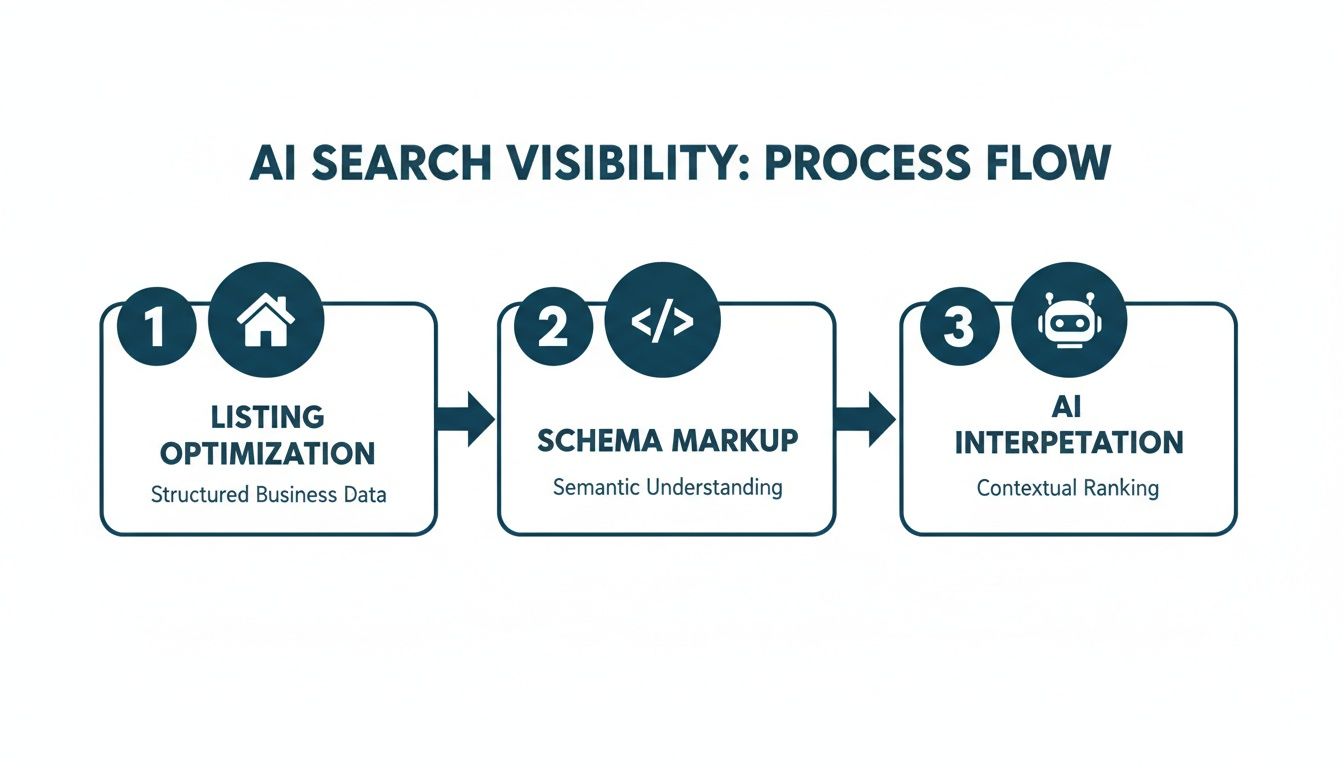
This really drives home how schema acts as the essential bridge between your property data and its visibility in advanced, AI-driven search.
Use Google’s Rich Results Test for Validation
Your first and most important stop should always be Google’s own Rich Results Test. This is the official source of truth for checking if your page is even eligible for the rich results you’re after. You can either paste your code snippet directly into the tool or give it the URL of a page where the code is already live.
The test gives you a clear answer on two fronts:
- Is it valid? It checks for syntax errors, ensuring your code is structured correctly.
- Is it eligible? It confirms if your page qualifies for rich results based on the schema you provided.
A successful test will greet you with a green checkmark, giving you the green light to deploy. If the tool finds errors, it will pinpoint the exact line of code causing the issue. Most of the time, the fix is simple—a missing comma, a typo in a property name, or a misplaced bracket.
The test might also show warnings. These aren't deal-breakers, but they are suggestions for recommended properties you’ve left out. Adding them can make your schema even more powerful, so it's worth paying attention to them.
Deploying Your Schema Markup
Once your code passes the test, it's time to get it onto your website. You generally have two ways to go about this.
- Direct Implementation: This is the most straightforward route. You just add the
<script>tag containing your JSON-LD into the<head>section of your property listing’s HTML. If you use a CMS like WordPress, a plugin or a simple theme file edit can get this done quickly. - Google Tag Manager (GTM): If you'd rather not touch your website's code directly, GTM is a fantastic alternative. You can create a new "Custom HTML" tag, paste in your JSON-LD script, and then set a trigger to fire that tag only on the specific listing pages where it belongs.
A Quick Tip from Experience: Whichever method you choose, always test a single listing page first. Deploy the code, then run that specific URL through the Rich Results Test again to make sure it’s working live. Once you confirm it’s good, you can roll it out to your other properties.
Keep an Eye on Performance
Your work isn't finished just because the code is live. The final piece of the puzzle is monitoring its impact in Google Search Console. Head over to the "Enhancements" or "Shopping" section, where you’ll find reports specifically for your RealEstateListing schema. This dashboard shows you exactly which pages have valid schema, which have errors, and how many search impressions they are getting.
This kind of ongoing monitoring is key. It helps you catch issues before they become major problems and lets you see the real-world results of your work. When you combine this with a smart local SEO strategy, the effects can be huge. For location-based searches so common in real estate, we’ve seen that optimized markup can improve local visibility by 3-5 positions.
If handling all this sounds like a lot, you might be interested in an automated solution. You can check out the different plans ListingBooster.ai offers to handle the entire process for you.
A Few Common Questions About Real Estate Schema
Even after you get the hang of it, a few questions always seem to pop up when agents and brokers start implementing schema for their listings. Let's run through some of the most common ones I hear.
Getting these details ironed out will help you move forward with confidence.
Do I Need to Be a Programmer to Do This?
Not at all. I get this question a lot, and the answer is a firm no. While schema is technically a form of code, you don’t need any programming background to put it to work. Think of JSON-LD less like writing software and more like filling out a highly detailed form.
For most real estate professionals, it boils down to two simple approaches:
- Copy-and-Paste Templates: The examples I've shared in this guide are your best friend. Just take the template, swap out the placeholder details with your property's information, and you're good to go. The structure is already done for you.
- Use an Automated Tool: Many modern real estate website platforms and plugins handle schema generation behind the scenes. Tools built specifically for this, like ListingBooster.ai, take it a step further by pulling your listing data and creating the right code automatically.
Your job is to understand what information needs to go into the schema, not to become a coder overnight.
How Long Until I See Any Results?
This is the million-dollar question, and the honest answer is: it depends. After you add the schema to your website, Google has to come back and crawl your pages to find it. That process can take anywhere from a few days to several weeks.
You can give Google a nudge by requesting a re-index of your key listing pages through Google Search Console. Typically, you might start seeing rich results show up in search within two to four weeks. As for a real impact on your traffic and click-through rates, you'll see that story unfold in your performance reports over the next couple of months.
My Two Cents: Be patient. Schema is a long-term play, not a quick hack. You're building a solid foundation of structured data that will consistently improve your visibility over time.
Can I Add Schema to My Zillow or Realtor.com Listings?
This one is a crucial distinction. You cannot add your own custom schema markup to listings on third-party sites like Zillow, Trulia, or Realtor.com. You simply don't have access to the back-end code of their websites.
This is precisely why optimizing your own website is so critical. It's one of your most effective strategies for competing head-on with the big portals for search visibility. When you drive traffic to your own site, you control everything—the user experience, how you capture leads, and your brand's story. Your website is your digital storefront, and schema is the best sign you can hang out front.
Should I Use RealEstateListing or Product Schema?
For any home, apartment, or property you're marketing, RealEstateListing is the right tool for the job. It was specifically designed for properties and includes fields that the generic Product schema just doesn't have, like leaseLength or numberOfRooms.
Some SEOs have played around with Product schema to try and get listings into product-style carousels, but that's really a workaround, not a best practice. Using RealEstateListing gives search engines the most accurate context about what you're actually offering. For long-term SEO health, always stick with the most specific schema type available.
Ready to stop wrestling with code and start dominating local search? ListingBooster.ai transforms any property into a complete marketing suite, automatically generating the perfect schema markup to make your listings discoverable by AI and search engines. See the difference for yourself with a free trial at https://listingbooster.ai.
Walk In With the Campaign Already Built
Listing copy, social posts, sourced Market Insights, growth scheduling, and direct publishing after approval from one real-estate-specific system. 25 free credits to start.
Related Posts
 Real Estate SEO
How to Get More Seller Leads with Real Estate SEO in 2026
Organic search still produces seller leads. The difference is how those leads are discovered, filtered, and trusted before a homeowner ever contacts you. For years, agents treated SEO as a way to rank a few pages and wait for form fills. That approach misses what seller SEO does. It puts your name, market coverage, and […]
 Real Estate SEO
Local SEO for Real Estate Agents with AI: A 2026 Guide
Real estate leads are still won or lost in local search, but the way agents earn visibility has changed. A strong position in search no longer guarantees attention, because buyers and sellers increasingly see AI-generated summaries before they ever click a website. That changes the job. Agents now need a web presence that search engines […]
 Real Estate SEO
How to Build Topical Authority as a Real Estate Agent: 2026
Real estate SEO used to reward volume. Publish enough pages, target enough keywords, and you could usually earn some visibility. That playbook is fading. The stronger model now is a connected authority system, built around pillar pages and supporting clusters that cover the buyer and seller journey in depth, as outlined in this real estate […]